Signal processing relies heavily on convolution and correlation to analyze and manipulate signals. This guide is designed for students and engineers who want clear explanations, MATLAB code, and guided practice questions—all structured for readability and practical application.
Introduction
In signal processing:
- Convolution determines how a system responds to an input signal.
- Correlation measures similarity between signals.
MATLAB provides efficient built-in functions:
conv()→ for convolutionxcorr()→ for correlation
Discrete-Time Convolution
Concept
Discrete convolution is defined as:
It involves flipping and shifting one signal, then summing the product.
MATLAB Example 1 (Basic)
% Discrete-Time Convolution Example

clc;
clear;
close all;

% Define signals
x = [1 2 3 4];
h = [1 1 1];

% Perform convolution
y = conv(x, h);

% Display results
disp('x(n) = '); disp(x);
disp('h(n) = '); disp(h);
disp('y(n) = '); disp(y);

% Plot
figure;
subplot(3,1,1); stem(x, 'filled'); title('x(n)');
subplot(3,1,2); stem(h, 'filled'); title('h(n)');
subplot(3,1,3); stem(y, 'filled'); title('y(n) = x(n)*h(n)');
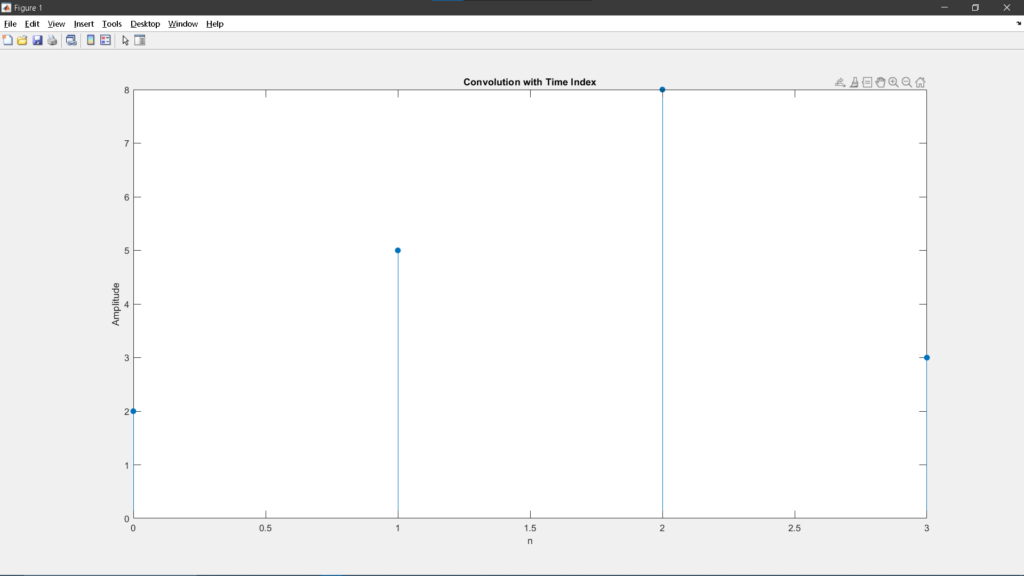
MATLAB Example 2 (With Time Index)
% Convolution with time indexing

x = [1 2 3];
nx = 0:2;

h = [2 1];
nh = 0:1;

y = conv(x, h);
ny = (nx(1)+nh(1)):(nx(end)+nh(end));

stem(ny, y, 'filled');
title('Convolution with Time Index');
xlabel('n');
ylabel('Amplitude');
Discrete-Time Correlation
Concept
Correlation measures similarity:
Terms
In the formula above.
- – shows how similar the two signals are
- x[k] – the first signal
- y[k+n] – the second signal (shifted)
- k – index used for adding values
- n – amount of shift (lag)
In simple terms, you shift one signal, multiply it with the other, and add the results to measure similarity.
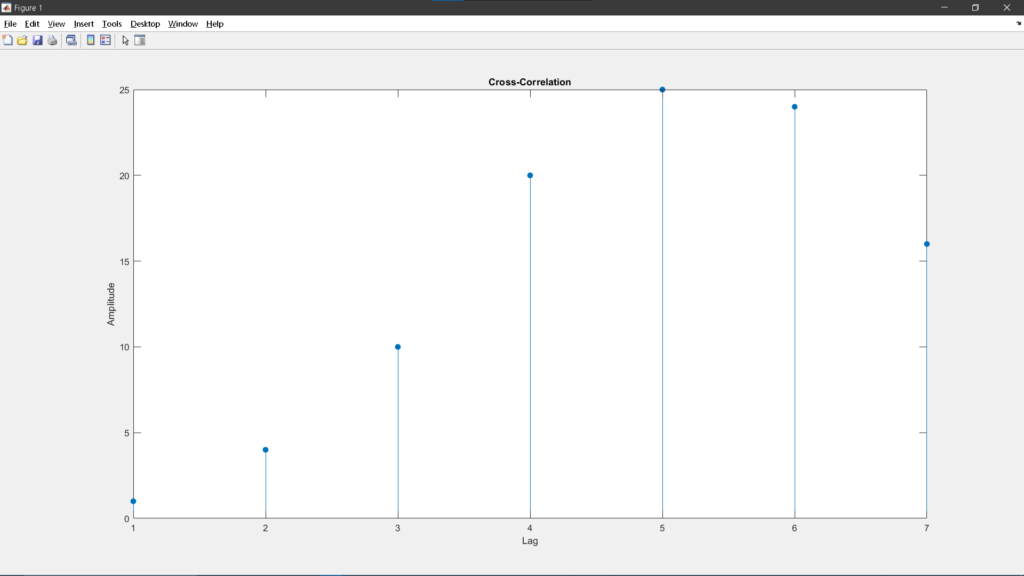
MATLAB Example 1
% Discrete Correlation Example

clc;
clear;
close all;

x = [1 2 3 4];
y = [4 3 2 1];

r = xcorr(x, y);

disp('Correlation result:');
disp(r);

stem(r, 'filled');
title('Cross-Correlation');
xlabel('Lag');
ylabel('Amplitude');
MATLAB Example 2 (Auto-correlation)
% Auto-correlation

x = [1 2 3 4];

r = xcorr(x, x);

stem(r, 'filled');
title('Auto-correlation of x(n)');
xlabel('Lag');
ylabel('Amplitude');
Continuous-Time Signals in MATLAB (Approximation)
MATLAB works in discrete samples, so continuous signals are approximated using high-resolution sampling.
Example 1: Continuous Convolution
% Continuous-Time Approximation using sampling

clc;
clear;
close all;

t = -5:0.01:5;

x = exp(-t) .* (t >= 0);   % exponential signal
h = ones(size(t));         % unit step approx

dt = t(2) - t(1);

y = conv(x, h) * dt;

ty = linspace(t(1)+t(1), t(end)+t(end), length(y));

plot(ty, y);
title('Continuous-Time Convolution (Approx)');
xlabel('Time');
ylabel('Amplitude');
Example 2: Continuous Correlation
% Continuous Correlation Approximation

t = -5:0.01:5;

x = sin(t);
y = cos(t);

r = xcorr(x, y);

plot(r);
title('Continuous-Time Correlation (Approx)');
Additional Practical Examples
Example: Moving Average Filter (Convolution)
% Moving average filter

x = [3 5 7 9 11];
h = (1/3)*[1 1 1];

y = conv(x, h);

stem(y, 'filled');
title('Moving Average Filter Output');
Example: Signal Detection (Correlation)
% Detect pattern using correlation

signal = [0 0 1 2 3 2 1 0];
pattern = [1 2 3];

r = xcorr(signal, pattern);

stem(r, 'filled');
title('Pattern Detection using Correlation');
Guide Questions (Practice Section)
Use these to test your understanding:
Conceptual Questions
- What is the main difference between convolution and correlation?
- Why is one signal flipped in convolution but not in correlation?
- How does convolution relate to LTI systems?
MATLAB Practice Tasks
- Modify the input signal in the convolution example to
[2 4 6 8]. What changes? - Create two sinusoidal signals with different frequencies and compute their correlation.
- Implement convolution manually using a
forloop instead ofconv(). - Compare results of
conv()and your manual implementation. - Increase sampling resolution (
dt) in continuous approximation. What happens to accuracy?
Challenge Problem
- Generate a noisy signal and use correlation to detect a hidden pattern inside it.
Key Differences Summary
| Feature | Convolution | Correlation |
|---|---|---|
| Purpose | System response | Similarity detection |
| Time reversal | Yes | No |
| MATLAB Function | conv() | xcorr() |
Importance in Electronics and Computer Engineering
Convolution and correlation are not just theoretical tools—they are core building blocks in modern engineering systems.
In Electronics Engineering
- Used in digital filter design (low-pass, high-pass, band-pass filters)
- Essential for signal reconstruction and noise reduction
- Applied in control systems to determine system response
In Computer Engineering
- Fundamental in digital signal processing (DSP) algorithms
- Used in image processing, including blurring, sharpening, and edge detection
- Plays a key role in machine learning and pattern recognition
- Applied in communications systems for signal detection and synchronization
These operations form the backbone of systems found in:
- Smartphones
- Audio and video processing systems
- Radar and communication devices
- Embedded and real-time systems
Conclusion
Convolution and correlation are essential operations that enable engineers to analyze, design, and optimize signal-based systems. With MATLAB, implementing these concepts becomes efficient and intuitive through built-in functions and visualization tools.
A strong grasp of these topics allows for deeper understanding of system behavior, improved signal analysis, and practical implementation across a wide range of engineering applications.